
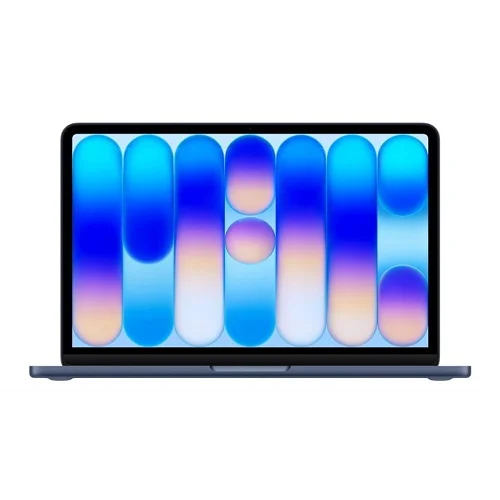
MacBook Neo
Price range: KSh 87,000.00 through KSh 100,000.00
Key Features of MacBook Neo
- A18 Pro chip – blazing fast everyday performance & Apple Intelligence
- 13-inch Liquid Retina display – 500 nits, 219 ppi, 1 billion colours
- Up to 16 hours battery life – all-day power for Kenyan professionals & students
- Durable 100% recycled aluminum body in 4 colours: Silver, Blush, Citrus, Indigo
- 8GB unified memory + 256GB/512GB SSD storage
- 1080p FaceTime HD camera + Spatial Audio speakers
- Ultra-light 1.23 kg design – perfect for Nairobi commutes
- macOS Tahoe with seamless iPhone integration
What’s in the Box
- 13-inch MacBook Neo
- Charger
Description
Apple’s Most Affordable Laptop Ever Changes the Game
The consumer tech landscape changed significantly with Apple’s official announcement of the MacBook Neo. Traditionally, stepping into the macOS ecosystem required a premium financial commitment, often steering budget-conscious buyers, students, and casual users toward Windows laptops or Chromebooks.
The entry-level MacBook Neo completely disrupts this paradigm. Positioned directly underneath the MacBook Air and MacBook Pro lineups, this ultra-portable device introduces a breakthrough price tag without abandoning the premium hardware execution Apple is famous for.
Whether you are looking for an affordable student laptop, an on-the-go productivity machine, or your very first Mac, this ultimate MacBook Neo review covers every specification, performance standard, and missing feature to determine if it belongs on your desk.
Key Specifications: The MacBook Neo At a Glance
To help you understand exactly what this entry-level machine delivers, here is the complete breakdown of the official hardware configuration:
| Feature | Apple MacBook Neo Specifications |
| Starting Price | $599 USD ($499 for Education) |
| Processor | Apple A18 Pro System-on-Chip (3nm architecture) |
| CPU Configuration | 6-Core (2 Performance Cores @ 4.04GHz + 4 Efficiency Cores @ 2.42GHz) |
| Graphics (GPU) | 5-Core Integrated Apple GPU with Hardware Accelerated Ray Tracing |
| Neural Engine | 16-Core Neural Engine (Optimized for Apple Intelligence) |
| Unified Memory | 8GB LPDDR5X-7500 (60 GB/s bandwidth) |
| Storage Options | 256GB or 512GB NVMe NAND Flash SSD |
| Display | 13.0-inch Liquid Retina Display (IPS LCD, 2408 × 1506 resolution) |
| Screen Brightness | 500 nits SDR max brightness |
| Battery & Power | 36.5 Whr Lithium-Ion Battery (Up to 16 hours video streaming) |
| Weight | 2.7 lbs (1.23 kg) |
| Dimensions | 11.71″ Width × 8.12″ Depth × 0.50″ Thickness |
| Wireless Tech | Wi-Fi 6E (802.11ax) + Bluetooth 6.0 |
| Operating System | macOS Tahoe |
Design and Color Palette: Fun, Vibrant, and Durable
Apple has stepped away from its traditional monochromatic color schemes to give the laptop a fresh, expressive visual layout aimed squarely at a younger demographic. Crafted from a highly durable, 100% recycled aluminum unibody enclosure, the chassis features smooth, softly rounded corners that feel exceptionally comfortable in the hand.
The Return of Colorful Macs
The laptop comes in a spectrum of four distinct finishes designed to bring personality back to everyday computing:
-
Blush: A soft, modern pastel pink.
-
Citrus: A warm, energetic lifestyle yellow.
-
Indigo: A deep, rich everyday casual blue.
-
Silver: The timeless, elegant, industrial aesthetic.
The color choices extend right down to the color-matched keycaps on the Magic Keyboard and custom, pre-installed macOS wallpapers, creating a beautifully cohesive visual layout. Weighing a mere 2.7 pounds (1.23 kg) and measuring exactly half an inch thick, it slips easily into backpacks and messenger bags without causing strain.
Display Quality: A Liquid Retina Screen in a Class of Its Own
Budget laptops usually cut corners on display quality, but Apple breaks that trend here. The machine sports a beautiful 13.0-inch Liquid Retina display with an crisp native resolution of 2408 × 1506 pixels (yielding 218 pixels per inch).
Screen Performance Under Real-World Use
While it locks at a standard 60Hz refresh rate and targets the standard sRGB color gamut rather than the wider filmmaker-grade P3 space found on more expensive models, the visual output is excellent.
-
500 Nits Brightness: This matches the standard MacBook Air, ensuring text remains sharp and perfectly legible even when working outdoors or next to sunny office windows.
-
1,400:1 Contrast Ratio: Delivers deeply satisfying dark tones and crisp whites for multimedia consumption.
-
Anti-Reflective Film: A built-in coating tames harsh reflections under strong fluorescent office lighting.
Performance: iPhone Power Meets the Mac Ecosystem
In an innovative engineering shift, this model represents the very first time Apple has deployed an iPhone-class processor inside a Mac computer. It is powered entirely by the 3nm Apple A18 Pro chip—the exact same flagship silicon engine that runs elite premium mobile devices.
Daily Multitasking & App Speeds
Do not let its smartphone origins fool you; when unshackled inside a laptop form factor with a larger aluminum heat dissipator, the A18 Pro flies. Backed by 8GB of ultra-fast unified memory running at 60 GB/s bandwidth, everyday tasks like handling 20+ Safari tabs, writing research papers, editing family albums, and updating Excel sheets execute instantaneously. Apple notes that this chip delivers speeds up to 50% faster for common desktop workloads compared to competing Intel Core Ultra 5 Windows laptops.
Fanless, Silent Operation
Because the A18 Pro is built on elite, hyper-efficient architecture, the laptop runs entirely fanless. Whether you are rendering a video track or pushing a casual game, the machine remains 100% completely silent, making it ideal for quiet libraries, lecture halls, or bedroom recording setups.
On-Device Artificial Intelligence: Built for Apple Intelligence
Artificial intelligence is deeply integrated into modern workflows, and this machine handles those tasks natively. Thanks to the integrated 16-core Neural Engine capable of up to 35 trillion operations per second (TOPS), the hardware is built from the ground up to support local execution of Apple Intelligence.
-
Writing Tools: Rewrite, proofread, and summarize text seamlessly across Notes, Mail, and third-party apps.
-
Photos Clean Up: Remove distracting background objects from photographs instantly with a tap.
-
Advanced Smart Summaries: Quickly catch up on lengthy notification threads, transcriptions, and document briefs.
Keyboard, Trackpad, and the Touch ID Catch
Typing on this machine is an absolute joy. It features Apple’s industry-standard Magic Keyboard, which utilizes a highly reliable scissor-switch mechanism delivering 1mm of key travel for a snappy, precise tactile experience. It sits right above a spacious Multi-Touch trackpad that supports fluent macOS gestures like pinching, swiping, and zooming.
The Biometric Security Breakdown
When configuring your laptop, pay close attention to the model tiers, as Apple handles security and access differently depending on your internal storage space:
-
256GB Storage Model: Features a standard power key. Secure biometric login via Touch ID is completely omitted. Users must input their manual text passcode to unlock the machine and verify web purchases.
-
512GB Storage Model: Features an integrated Touch ID sensor right on the power button, allowing for one-touch login, Apple Pay confirmation, and secure account unlocking.
Ports and Connectivity: Where the Compromises Are
To hit an unprecedented entry-level price point, certain concessions had to be made regarding peripheral connections. The laptop features a minimalist port layout that will require heavy dongle users to adapt.
Managing Your Peripherals
The separation of data transfer speeds across the two physical ports means you must be deliberate with your connections:
-
The Fast Port: Use the primary USB 3 port for connecting external SSD drives, high-speed docks, or driving an external workstation display (supports up to 4K resolution at 60Hz).
-
The Slow Port: Dedicate the USB 2.0 port exclusively for connecting your power charging cable, a wireless mouse, or basic accessories that do not require high data bandwidth.
Battery Life, Camera, and Audio Excellence
Despite its compact 36.5-watt-hour battery capacity, the extreme efficiency of the 3nm A18 Pro silicon squeezed into this architecture delivers exceptional real-world endurance.
-
Up to 16 Hours: Enjoy extensive all-day battery life during continuous video streaming sessions.
-
Up to 11 Hours: Keeps you productive through up to 11 hours of active wireless web browsing, easily outlasting a full school day or an average shift at the office.
Webcam and Sound Production
Video calls are crisp and professional thanks to an upgraded 1080p FaceTime HD camera powered by an advanced image signal processor that cleans up grainy noise in dim room lighting. For audio, the built-in dual-speaker sound system supports immersive Spatial Audio and Dolby Atmos, delivering deep, punchy acoustics that belie the machine’s slim profile.
Pros and Cons: A Balanced Consumer Perspective
To help your website visitors make an informed purchase decision, here is an objective overview of the device’s main strengths and weaknesses:
What We Love (The Pros)
-
Unbeatable Pricing: Entry into the macOS ecosystem at $599 ($499 for students) offers unmatched market value.
-
Premium Metal Build: Uses the same high-end aluminum unibody build quality found on models twice its price.
-
Elite Efficiency: Completely fanless, whisper-silent design that stays cool under standard daily workloads.
-
Vibrant Visual Identity: The new colorful aesthetics look stunning and stand out in a sea of gray laptops.
-
AI Ready: Full hardware support for Apple Intelligence tools.
What to Consider (The Cons)
-
No Keyboard Backlight: The keys do not illuminate, making typing in pitch-black rooms difficult for hunt-and-peck typists.
-
8GB Memory Ceiling: Unified RAM is permanently soldered to the motherboard and cannot be upgraded later.
-
Asymmetrical Ports: One USB-C port is restricted to legacy USB 2.0 speeds.
-
Base Tier Omits Touch ID: Fingerprint login requires stepping up to the 512GB storage trim.
Final Verdict: Who is the MacBook Neo For?
The Apple MacBook Neo is a triumphant achievement in engineering budget hardware. By carefully selecting which features to trim (such as the keyboard backlight and secondary port speeds) while keeping the core processing power, display crispness, and structural build quality exceptionally high, Apple has created the ultimate value laptop.
It is an ideal purchase for students needing a long-lasting study companion, writers looking for an ultra-portable text engine, and everyday users focused on web browsing, streaming, and light productivity. If you want a brand-new Mac experience without paying a steep premium, this machine is a definitive must-buy.
Frequently Asked Questions (FAQs)
Q: Can I upgrade the RAM or SSD storage on the MacBook Neo later?
A: No. Like all modern Apple silicon computers, the processor, memory, and storage are permanently integrated onto a single circuit board. You must select your configuration at the time of purchase.
Q: Does the base model include a charging brick in the box?
A: Yes. The device ships with a high-quality USB-C charging cable. It supports power input from any standard USB Power Delivery (PD) source of 20W or higher.
Q: Can I run heavy professional apps like Final Cut Pro or Xcode on this laptop?
A: Yes, the A18 Pro chip can run professional software. However, because the laptop is fanless, the system will intentionally slow its speed (thermal throttle) during long, heavy video rendering or code compiling sessions to manage heat. For continuous professional workloads, a MacBook Pro is highly recommended.
Additional information
| Memory | 8/256, 8/512 |
|---|
Related products
-
Sale!
iPhone 18 Pro
Price range: KSh 215,000.00 through KSh 310,000.00Select options This product has multiple variants. The options may be chosen on the product page -
Sale!
iPhone 18
Original price was: KSh 170,000.00.KSh 150,000.00Current price is: KSh 150,000.00. -
Sale!
Apple 20W USB-C Power Adapter
Original price was: KSh 4,000.00.KSh 3,500.00Current price is: KSh 3,500.00. -
Reviews
There are no reviews yet.